This is going to be a very long series about a music app (or two), where I do everything in my power to procrastinate research.
- /chr: a chord builder app (jump to main content)
Not written yet:
- /chr: The pain of syncing states
- Music theory: Preliminaries
- Music theory: (Roman) Numerical Analysis
- Music theory: What’s this chord?
- Music theory: Tension in the deep Tonal Pitch Space
- Music theory: Dissonance — the science of alerts that still can’t wake me up at 8am
- Music theory: Progression, where one (or a few) things leads to another
Shameless plug before we begin: I also have a web app to learn the piano!
I don’t advertise this mostly because there is zero music theory and 100% pure implementation, but I’m still pretty proud of it regardless. Take a look!
Introduction
/chr: [slash-chord] is a chord builder app that has all the fancy functionalities that I (thought I) needed to create fancy chord progressions! It has:
- Chord analysis
- Chord building by property
- Chord building by notes
- Sequencer
- MIDI listening and recording
- Progression analysis
You can find it here at https://ngoc.io/chr. Implementation details will be provided in the next post, but I assume no one really cares about that.
This document should be updated as changes are rolled out, but even I wouldn’t count on myself to reliably do it…
Functionalities
Let us start with some project-wide configurations in the top-right corner:

Project configurations.
With that out of the way, here is a basic list of functionalities that /chr supports:
Chord Builder
You can toggle between Simple and Advanced mode, where the former will simplify options to just diatonic roots and basic chord qualities/extensions, and the latter will give you everything.
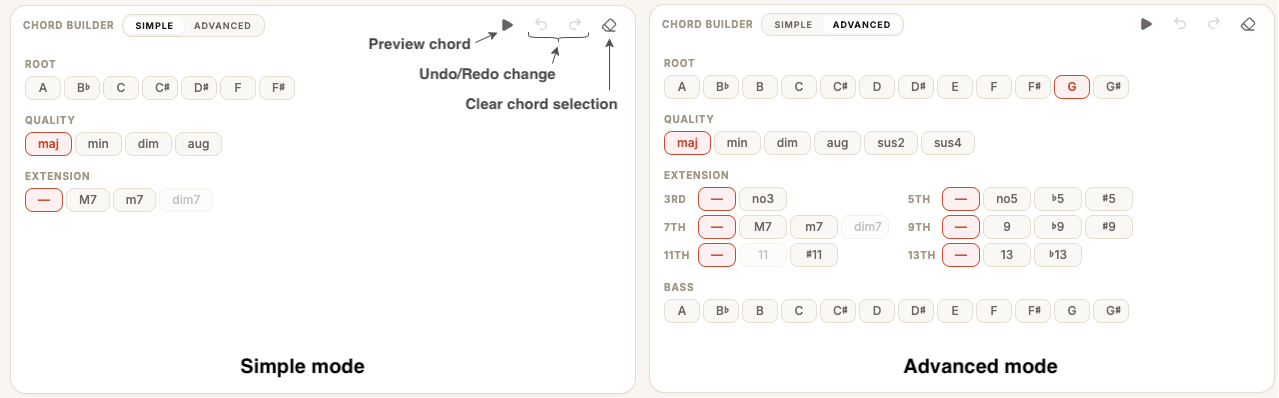
The chord builder UI, toggleable.
The buttons are self-explanatory: Preview will play the chords out, Undo/Redo will revert/recommit the last change you made to the chord configuration, and Clear will, well, clear out the selection.
Keyboard
The keyboard is scrollable, and can be locked to C (i.e. first key is a C note), or to project key signature (i.e. first key is the key signature’s root). Each note can be clicked on to toggle on/off within the note list — this is the manual voicing editing for chords, because who just wants simple triads (but if you do, I got that too!)
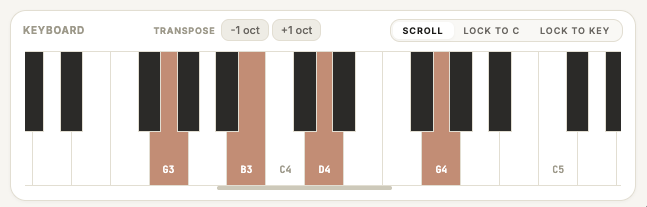
On-screen keyboard.
You can also transpose the chord up/down an octave with the transpose buttons.
Hint: transposition is undo-able with the Builder undo/redo buttons!
Chord Analysis
Here shows information about the chords in question — check out the music theory posts above to see how they are determined!
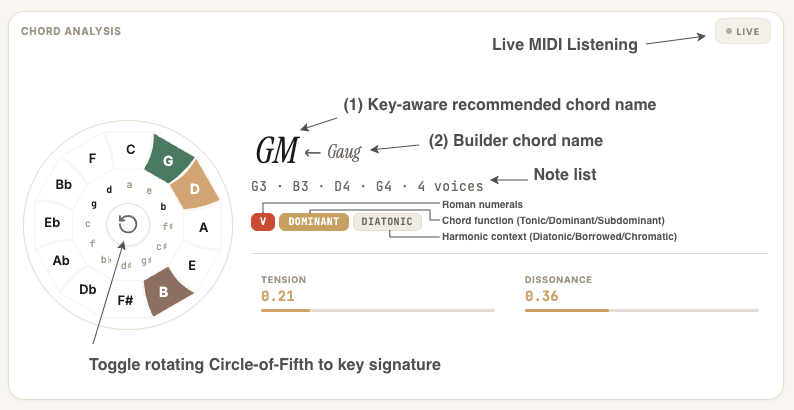
Chord analysis screen.
The above screenshot shows a nuanced situation when your selection corresponds to an unlikely chord given a key signature context, or conflicts with the current note list, which is the preferred source of truth for chord detection. This happens very often if there is some custom voicing: when you update the builder selection, the chord builder does its best to satisfy your request given the current note list, but likely will keep some non-chord passing notes, affecting the chord detection result. You have two ways to correct this disagreement:
- The “Oh okay” approach: clicking on (1) will update the chord builder based on the new detected chord name.
- The “I know what I’m doing” approach: clicking on (2) will reset the note list to the standard version of whatever chord you selected.
Last but not least is the Circle-of-Fifth: it will show you which notes in the circle is in the current chord. Unlike the traiditional use of CoF to determine key relativity, we use it to determine chord properties — making it easy to see if, e.g. there is a tritone causing dissonance, aiding visualization for Tension and Dissonance metrics.
Hint: you can click on the note names on the CoF to toggle inclusion/exclusion of said note in the note list! Be slightly careful that it will apply to that note across all octaves.
MIDI Listening
Just click on the Live button within the Analysis card title to enable MIDI listening. All above components will react to the MIDI input — especially chord detection.
Hint: you can use your computer keyboard to play notes/chords too!
Sequencer
Here stores the sequence of chords that can be arranged and played. The specific chord card can be edited by single clicking, after which editing can be done on the builder or keyboard — choose your preferred warrior.

Sequencer controls.
The sequencer supports dragging chord cards, resizing, multiselecting, and double click on an empty space to create a blank card. Try it out!
Hint: there is a lot of keyboard shortcuts for the sequencer! See the list below.
MIDI Recording
Make sure the Record button is toggled on, and press Play! MIDI listening will automatically be enabled, and whatever you play on the MIDI keyboard will be recorded onto the sequencer from the playhead. Note that it will be quantized to whatever granularity you selected.
Hint: you can pause and resume recording, although I don’t know how or why you would want to do that, but I’m supporting that nonetheless.
Progression Analysis
Not implemented yet — it’s a lot harder to design a good algorithm than I thought.
Shortcuts
As hinted, there are a lot of shortcuts to be used in this app! I hope all of them are very intuitive, as it really was designed to feel like Ableton Live which I really like.
Playback
- Space: Play/Stop
- Shift + Space: Pause
- R: Toggle record mode
- Cmd+O: Toggle metronome
- Cmd+M: Toggle mute
- AASDFGHJKL and WETYUOP: virtual keyboard
- ZXCVBNM: Diatonic chords of the project key
Sequencer
- Cmd+Z: Undo chord action
- Cmd+X: Cut the selected chords — remove them and store them in the clipboard
- Cmd+C: Copy the selected chords — only store them in the clipboard
- Cmd+V: Paste the clipboard chords starting at the selector head
- Cmd+Shift+Z/Cmd+Y: Redo chord action
- Cmd+A: Select all chords
- Cmd+D: Duplicate selected chords
- Cmd+E: Split the chord at the selector head
- Escape: Get-me-out-of-whatever-this is
- Backspace/Delete:
- When editing a chord, press once to clear that chord to empty, and once more to delete it off the sequencer.
- When selecting one or more chords, press to delete the selected chords.
Analyzer
- I: toggle MIDI live listening.
Future improvements
- Super+something for the rest of the existing functionalities.
Closing thoughts
Well, it has been a mess of a development, but here we are! I had to learn a lot in both web development and music theory in the process, but it was fun! Well, not so much for my research progress though. Also, I now kind of understand why people like JS development: I really like the fact that it’s responsive and universal. I have this really bad trait where I like everything to be perfect, and as a result everything I make needs to be intuitive, accessible, and minutely refined even if no one uses it or even ever heard of it. Well, time to not make any music and move on to the next distraction!
…after I’m actually done with this project, which is going to take a while given the whole enormous list of unimplemented features up there.